You CAN still join the private facebook group and access all of the instructional videos, social dancing, step sheets and more (it just won’t be LIVE, but it will feel like it ;-))
Step 1 - Enter how many tickets you would like (this allows you to pay for other people).
Step 2 - Enter your details (the person making the payment).
Step 3 - Enter the Facebook details for the person wishing to join, also fill out dance level and check the waiver. If you are paying for multiple people you will need to do each attendee. Then click 'Proceed to Payment Options'
Step 4 - Choose your payment method.
If paying by credit card using paypal choose that option.
If you wish to send money via Venmo, Apple Pay or Zelle please choose INVOICE.
The click 'Proceed to Finalize Registration'
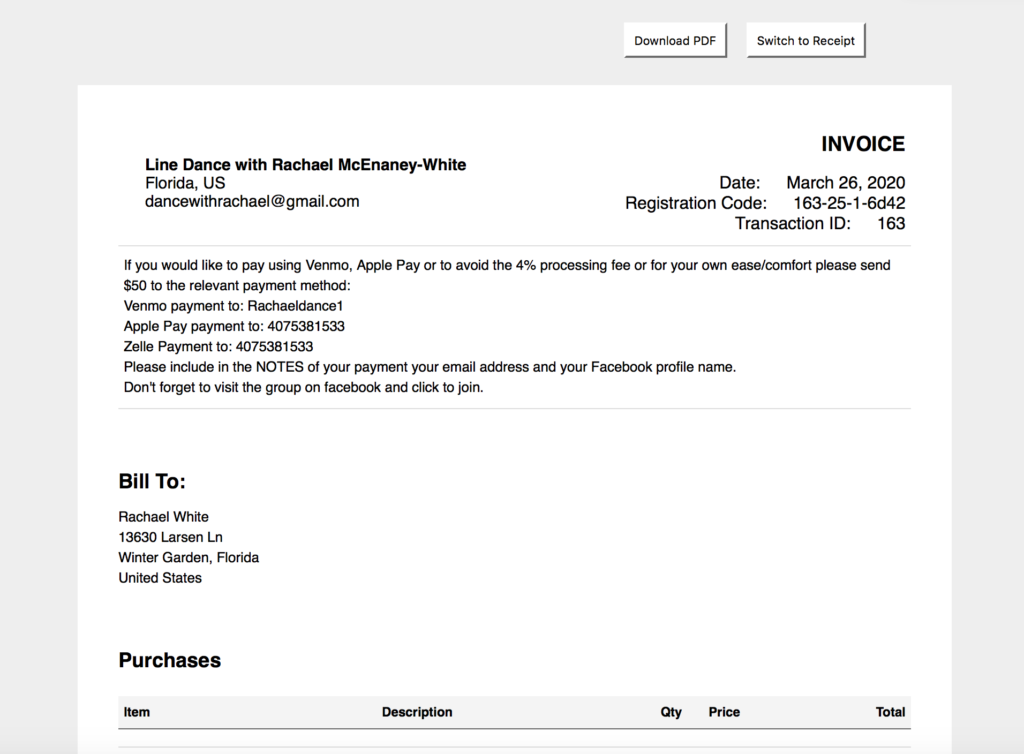
Step 5 - Send your payment. If you chose to pay by INVOICE you will receive a confirmation and receipt showing pending until you send the payment. The instructions are printed on the receipt and also pasted here for your convenience.
If you would like to pay using Venmo, Apple Pay or to avoid the 4% processing fee or for your own ease/comfort please send $50 to the relevant payment method:
Venmo payment to: Rachaeldance1
Apple Pay payment to: 4075381533
Zelle Payment to: 4075381533
Please include in the NOTES of your payment your email address and your Facebook profile name(s). Don't forget to visit the group on facebook and click to join.
Click ‘View Full Order Confirmation Receipt’
You can click ‘Switch to Invoice’ in the top right to see instructions.
Step 6 - Join The Group After you have successfully filled in the registration form and joined the group please visit www.facebook.com/groups/digitaldanceweekend and JOIN GROUP There should be 3 questions to answer (don't worry if not), please answer them and wait for your approval. If you haven't been accepted into the group within 48 hours please email dancewithrachael@gmail.com